

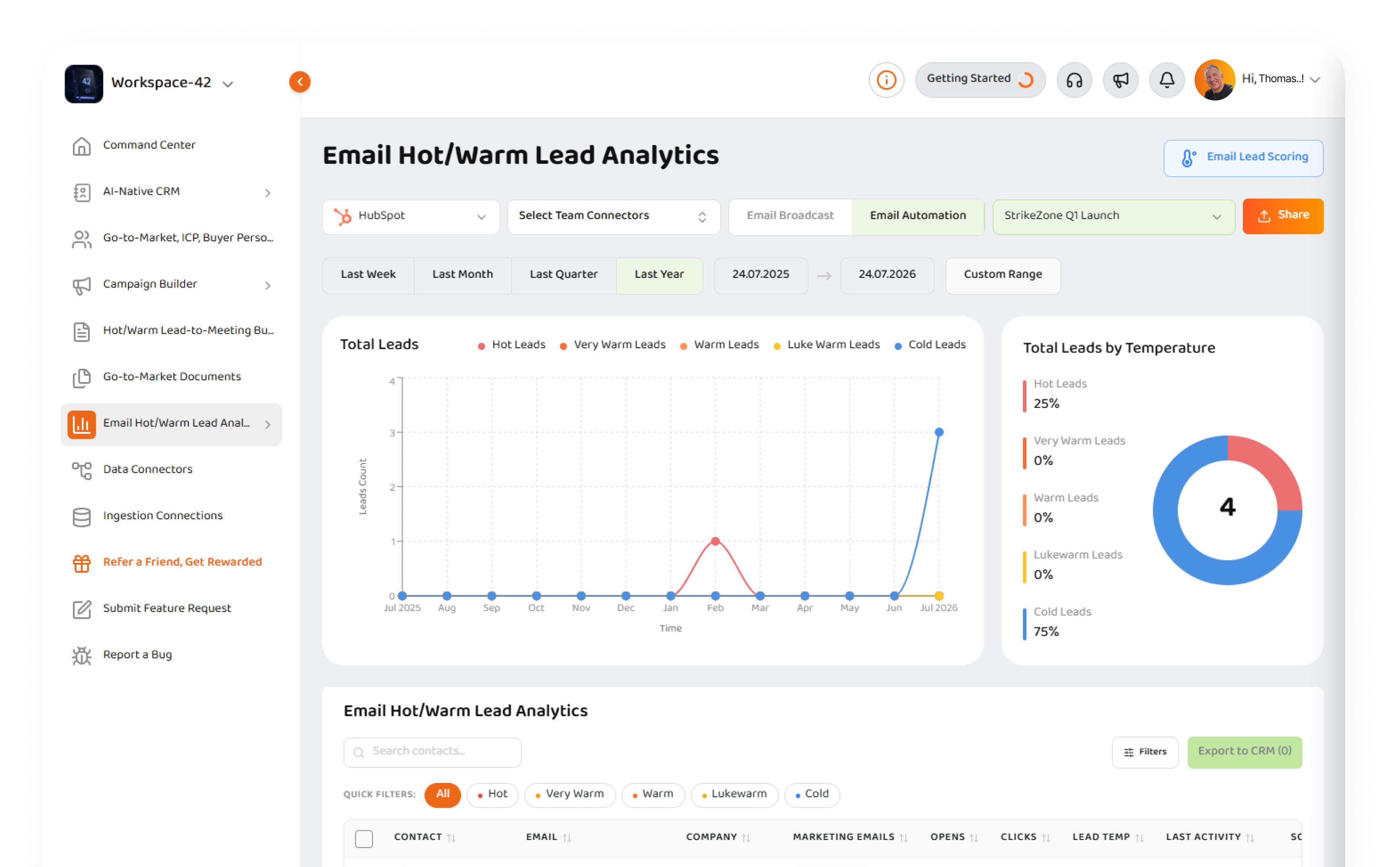
Turn email engagement into sales focus.
Use Strikezone Email Hot/Warm Lead Analytics to see which contacts are opening, clicking, warming up, and ready for follow-up across email broadcasts, automations, campaigns, and connected data sources.
Explore Product
Stop guessing which email leads deserve follow-up.
Email campaigns create signals every day. People open. People click. Some contacts engage once. Others come back again and again. The hard part is knowing which signals matter and which leads your team should act on first. Most small teams do not have a revenue operations team watching every campaign, segment, connector, contact, and follow-up opportunity. Strikezone Email Hot/Warm Lead Analytics gives teams a faster way to understand email engagement, prioritize follow-up, compare campaigns, and move the right contacts toward qualified sales conversations.
See who is engaging
Identify Cold, Lukewarm, Warm, Very Warm, and Hot leads based on email engagement.
Prioritize follow-up
Focus your team on contacts showing stronger activity instead of manually searching campaign reports.
Compare campaigns
Review campaign performance side by side to understand which messages, audiences, and sequences are working.
Move into CRM action
Export or push selected leads into CRM workflows where supported, so engagement can become follow-up.
Built for email broadcasts, automations, and connected data sources.
Email engagement often lives across different systems. One campaign may run in HubSpot. Another may come from Zoho. Another may be connected through Salesforce or a future email marketing connector. Strikezone is designed to normalize email engagement into a common analytics experience so teams can understand lead temperature without jumping between disconnected tools. Users can select providers, team connections, email broadcasts, email automations, campaigns, and reporting windows to see which contacts are engaging and which campaign activity deserves attention.
Provider selection
Work with connected sources such as HubSpot, Zoho, Salesforce, and future email-capable connectors.
Team connectors
Select team-level connections so campaign data can be reviewed in a shared workspace context.
Email broadcasts
Review one-time campaign activity and identify contacts showing engagement.
Email automations
Analyze sequence and automation activity where supported by the connected source.
Campaign selector
Choose the campaign, broadcast, or automation you want to analyze.
Date-range controls
Review activity across last quarter, last year, custom ranges, or selected reporting windows.
Understand lead temperature at a glance.
Email Lead Scoring helps teams understand which contacts are engaging with email campaigns and which leads may be stronger candidates for faster follow-up toward a quality sales meeting. Strikezone classifies contacts into clear email engagement temperatures so users do not need to interpret raw opens and clicks manually.
Cold
No measurable email engagement in the selected reporting window. Keep the contact in nurture, review targeting, and monitor for future engagement.
Lukewarm
The contact has shown an early signal of interest. Monitor closely and look for another signal before escalating priority.
Warm
Interest is building through repeated interaction with email content. Increase attention and consider targeted follow-up.
Very Warm
The contact is showing strong repeated engagement. Review account context and prepare outreach aimed at securing a quality sales meeting.
Hot
The contact is highly engaged and should be prioritized quickly for follow-up, qualification review, or lead-to-meeting workflow.
Email Lead Scoring without CRM admin headaches.
Lead scoring is usually too difficult for small teams. It often requires CRM administrators, backend configuration, custom scoring rules, data management, and constant maintenance. Strikezone starts with an out-of-the-box Email Lead Scoring model for email engagement. The goal is simple: give small and medium business teams useful prioritization fast. Users can understand which contacts are Cold, Lukewarm, Warm, Very Warm, or Hot without building a complex scoring system from scratch.
Out-of-the-box scoring
Start with a clear email engagement model based on opens and clicks inside the selected reporting window.
Clear temperature badges
Use visible labels so sales and marketing teams can quickly understand who needs attention.
Engagement context
Review opens, clicks, last activity, campaign source, connector source, and lead score in one view.
Built for fast time to value
Help teams prioritize follow-up quickly without waiting for a long CRM implementation.
Future custom scoring
Advanced teams will be able to personalize scoring methods through simple UI controls and AI-native workflow inputs where supported.
No backend coding required
The long-term goal is to make scoring configuration easier for business users, not only technical CRM administrators.
Compare campaigns side by side.
Most email tools show campaign analytics one campaign at a time. That makes it difficult to understand which message, audience, subject line, sequence, or offer actually performed better. Strikezone campaign comparisons help users review campaign performance side by side so teams can make better decisions about what to scale, what to improve, and what to stop doing.
A/B and A/B/C comparison
Compare two or three campaigns to review performance differences across audiences, messages, or sequences.
Hot and warm lead breakdowns
See how many Cold, Lukewarm, Warm, Very Warm, and Hot leads each campaign produced.
Performance review
Compare opens, clicks, lead temperature, engagement movement, and downstream follow-up potential.
Message learning
Understand which campaign content, timing, or audience may be producing stronger buyer signal.
Scale what works
Use campaign comparison to double down on better-performing messages and refine weaker ones.
Shareable insight
Use comparisons for marketing reviews, founder updates, team planning, and stakeholder conversations.
Detailed Campaign Comparisons for deeper analysis.
Sometimes teams need more than a top-level campaign report. They need to compare multiple campaigns, multiple lead groups, and specific contacts across engagement signals. Detailed Campaign Comparisons helps teams analyze campaign data at a deeper level. Users can compare campaigns, filter leads, review engagement, and identify high-potential contacts or buyer groups that deserve follow-up.
Compare multiple campaigns
Select campaigns from connected sources and review them together instead of one report at a time.
Analyze large lead sets
Review campaign engagement across many contacts and filter down to the leads that matter.
Filter by temperature
Focus on Hot, Very Warm, Warm, Lukewarm, or Cold leads.
Review contact details
See contact, email, company, campaign, opens, clicks, lead temperature, last activity, and score where available.
Find overlap and differences
Understand which leads appear in multiple campaigns and which campaigns are creating stronger engagement.
Export and take action
Export filtered results or send selected leads into CRM workflows where supported.
Lead Drilldown View for high-intent contacts.
Top-level analytics help teams find patterns. Lead drilldown helps them understand the individual contacts behind those patterns. With Lead Drilldown View, teams can inspect activity for selected leads across campaigns, understand what they opened or clicked, and prepare more relevant follow-up.
Inspect individual leads
Review engagement history for one contact or a selected group of leads.
Compare activity across campaigns
See how the same person engaged across multiple campaigns or messages.
Understand clicked content
Review which calls to action or links generated interest where connector data supports it.
Prepare better outreach
Use engagement context to write more relevant follow-up.
Identify ICP clusters
Compare high-intent contacts to identify patterns across job titles, companies, industries, or buyer groups.
Move into meeting motion
Use drilldown insights to support Hot Warm Lead to Meeting Builder workflows.
From analytics to meetings.
Email engagement is only useful if your team acts on it. Strikezone connects email analytics to the broader Go-to-Market workspace. A Hot or Very Warm lead can move from campaign analytics into follow-up, CRM review, meeting preparation, task creation, and lead-to-meeting workflows. That is the difference between reporting and execution.
Prioritize the right contacts
Use temperature and engagement history to decide where the team should focus first.
Create CRM follow-up
Push selected leads into CRM workflows where supported.
Prepare outreach
Use engagement data to write more relevant emails, calls, LinkedIn messages, and meeting invitations.
Use Frank AI - Sales Manager
Ask Frank to help summarize lead context, draft outreach, prepare meeting notes, or suggest next actions.
Connect to Hot Warm Lead to Meeting Builder
Move high-engagement contacts into a structured workflow for follow-up, meeting creation, and opportunity progression.
Keep the full motion connected
Email analytics, CRM records, campaigns, tasks, meetings, and follow-up stay inside one workspace.
Better campaign decisions for small teams.
Small and medium business operators need to know what is working without hiring a full analytics team. Email Hot/Warm Lead Analytics helps teams answer practical questions: Which campaign created the most warm leads? Which contacts should sales follow up with first? Which audience segment is responding? Which message deserves another test? Which campaign should we stop wasting time on? Which leads should move into a meeting workflow?
For founders
See which campaigns are creating real buyer signal and where the team should focus next.
For marketers
Understand which messages, audiences, and campaigns are creating stronger engagement.
For sales teams
Find the people who are already showing interest and prepare better follow-up.
For agencies and consultants
Show clients which campaigns are producing measurable lead movement.
For RevOps teams
Normalize campaign engagement across systems and turn it into follow-up logic.
For customer-facing teams
Use engagement data to start better conversations with the right people.
Why Strikezone?
Built for email buyer signals
Strikezone turns opens, clicks, campaign activity, and lead temperature into practical follow-up intelligence.
Connector-aware analytics
Review email engagement from connected systems such as HubSpot, Zoho, Salesforce, and future email marketing connectors.
More than campaign reports
Compare campaigns, drill into leads, score engagement, and move selected contacts toward CRM action.
Frank AI built in
Frank AI - Sales Manager helps teams interpret context, write follow-up, prepare meetings, and move faster.
Designed for SMB speed
Small teams get a practical analytics workflow without enterprise complexity or long CRM configuration projects.
Connected to execution
Email analytics can feed CRM follow-up, meeting workflows, campaign planning, and Go-to-Market decisions.
See Email Hot/Warm Lead Analytics in action
From choosing a campaign to prioritizing hot leads, here's what the workflow looks like inside Strikezone.
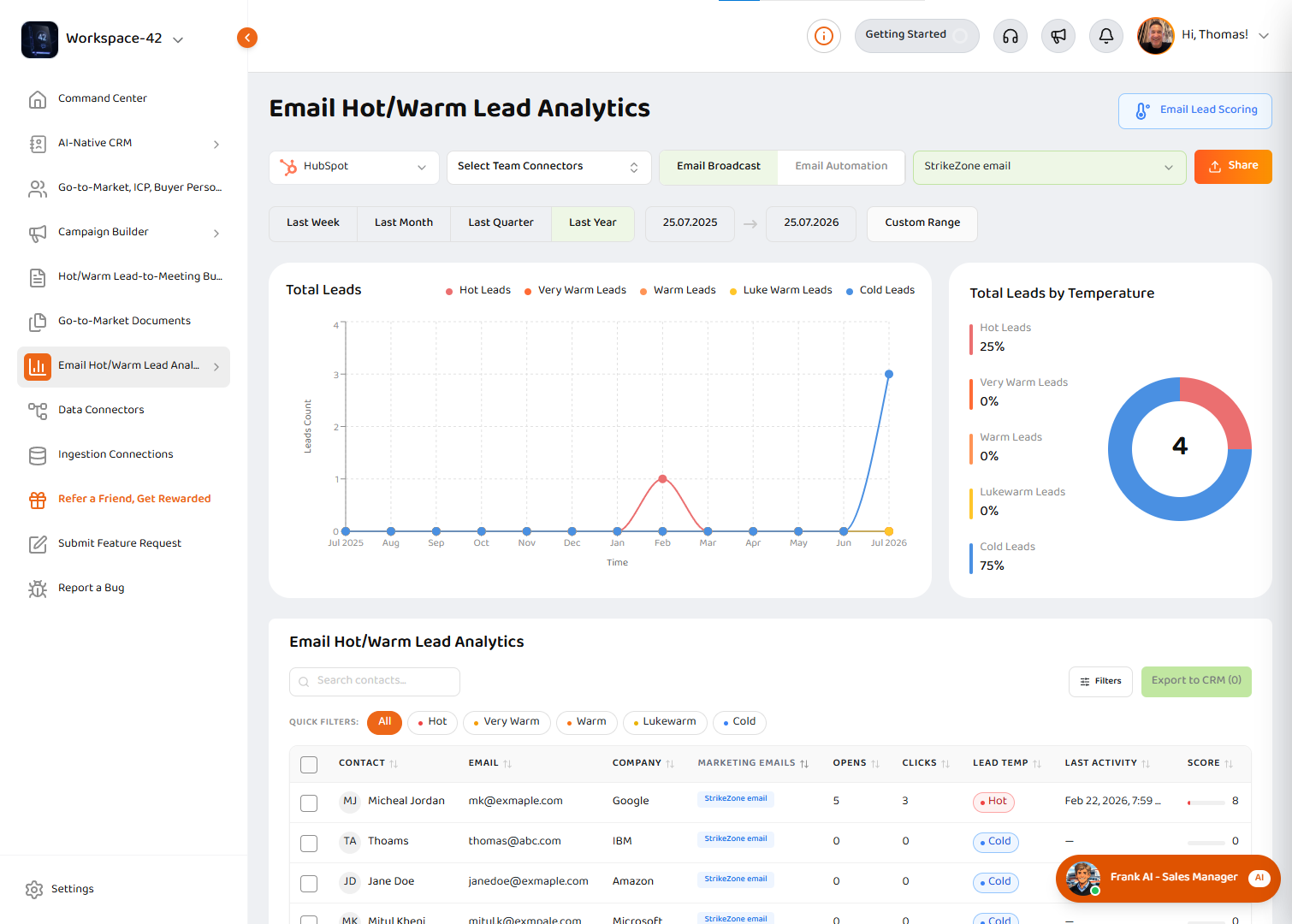
Email Hot/Warm Lead Analytics dashboard
See which contacts are heating up across email broadcasts, automations, campaigns, and connected data sources.
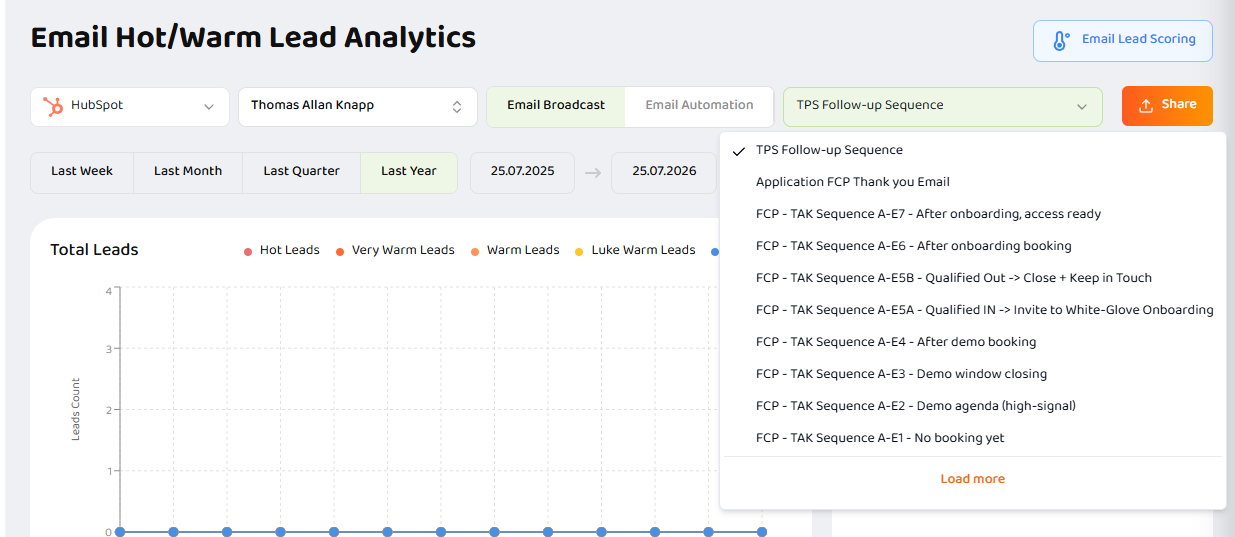
Campaign selector dropdown
Choose the campaign or automation you want to analyze without leaving Strikezone.
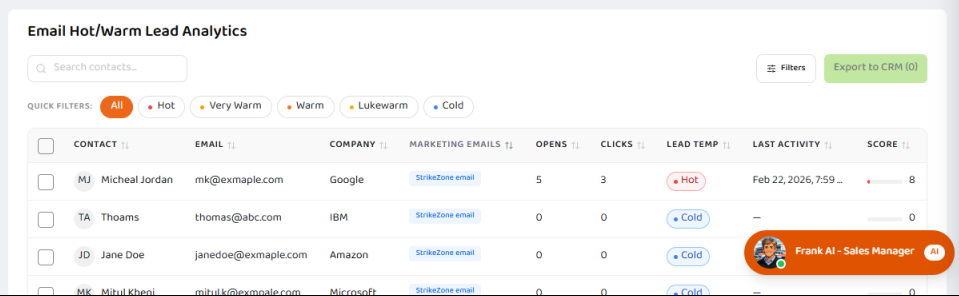
Lead table with temperature badges
Prioritize Hot, Very Warm, Warm, Lukewarm, and Cold leads from one clear view.
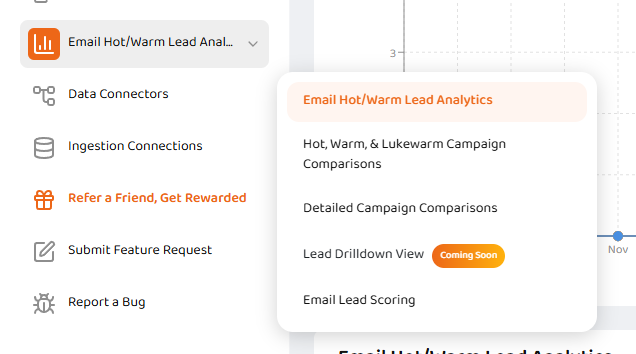
Product subnavigation
Move from top-level analytics to campaign comparison, lead drilldown, and scoring methodology.
Email Hot/Warm Lead Analytics FAQ
Clear answers about email engagement analytics, lead temperature, campaign comparisons, and CRM follow-up.
Find the leads your team should act on first.
Use Strikezone Email Hot/Warm Lead Analytics to understand email engagement, compare campaign performance, prioritize follow-up, and move high-intent contacts toward qualified sales conversations.