

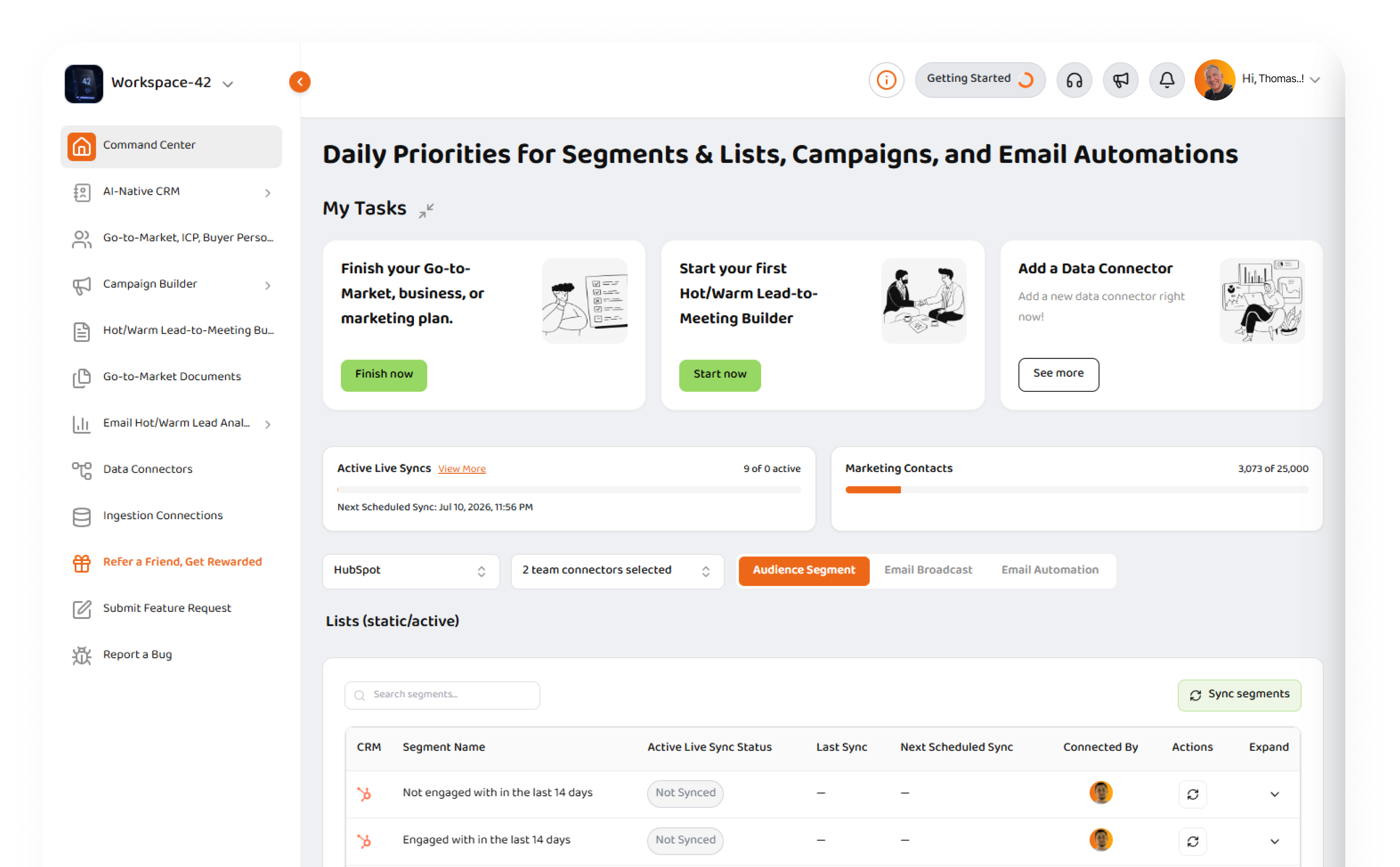
Daily priorities for segments, campaigns, and email automations
Strikezone Command Center gives your team one daily workspace to see what needs attention, sync your connected data, review Hot and Warm lead signals, and move faster from customer activity to sales action.
Explore Product
Start every day with the right priorities
Command Center is the daily operating view inside Strikezone. It brings together your active Go-to-Market work, connected data, sync status, lead temperature, campaign engagement, and next actions in one place. Instead of jumping across disconnected tools, your team can start from one workspace, understand what changed, and decide where to focus next.
See what needs attention
Review active tasks, unfinished workflows, connected data status, and priority Go-to-Market actions.
Sync the right context
Choose a segment, list, campaign, or email automation and refresh the data that matters.
Prioritize Hot and Warm leads
Use lead temperature signals to focus follow-up on the contacts showing the strongest engagement.
What is Strikezone Command Center?
Command Center is the daily priorities workspace for Strikezone. It helps SMB teams understand what is happening across segments, lists, campaigns, and email automations - then move directly into the next action. Your team can select a specific context, see where the data came from, check whether it is synced, review KPIs, and drill into the contacts and engagement events behind the numbers.
Command Center connects planning, data, analytics, and execution so your team does not have to hunt across modules to find the next best move.
Built around the work your team actually does
Command Center is organized around the Go-to-Market contexts your team already works with: segments and lists, email campaigns, and email automations.
Segments & Lists
Review contact groups, lead temperature, lead scores, lifecycle stage, company data, and last activity.
Email Campaigns
Track campaign performance, recipients, open rate, click-through rate, Hot leads, Warm leads, and engagement.
Email Automations
Understand automation performance across enrolled contacts, sequence steps, engagement, and sales signals.
Connected Data Context
See which connector your data came from, when it was last synced, and whether it needs attention.
Move from Signal to Sales Action Faster
Select context
Choose a segment, list, email campaign, or email automation.
Sync data
Refresh the selected context and keep your workspace current.
Review KPIs
See lead temperature, engagement, and performance signals.
Drill down
Open contact-level views, campaign details, and engagement activity.
Take action
Prioritize follow-up, review profiles, and move leads toward meetings and pipeline.
Prioritize the leads that matter most
Command Center helps teams focus on the contacts most likely to need follow-up now. Lead temperature gives your team a fast way to sort, filter, and act on engagement.
Hot Leads
Contacts showing stronger buying signals, recent engagement, or higher-priority activity.
Warm Leads
Contacts showing meaningful engagement that may be ready for timely follow-up.
Lukewarm Leads
Contacts with some activity, but not enough signal yet for top-priority sales action.
Cold Leads
Contacts with limited or no meaningful recent activity.
Lead Score
A supporting signal that helps your team compare contacts and prioritize outreach.
Understand which campaigns and automations are creating action
Command Center gives teams a clearer view into campaign and automation performance. Review recipients, open rate, click-through rate, Hot and Warm leads, last synced status, and contact-level engagement. For email campaigns, your team can drill into the contacts influenced by a specific campaign. For email automations, your team can review performance across steps and understand which messages are creating engagement.
Campaign performance
See recipients, open rate, click-through rate, Hot leads, Warm leads, and last synced status.
Contact-level drill-down
Open the contacts behind the campaign or automation metrics.
Email content context
Review campaign or automation email content alongside performance signals.
Engagement-first workflow
Move from performance data to follow-up decisions without leaving the workspace.
Know what is synced, stale, or ready to refresh
Command Center makes data freshness visible. Your team can see whether a selected segment, campaign, or automation is not synced, syncing, up to date, stale, or failed. When sync completes, KPIs and tables update automatically. If something fails, Command Center gives your team a path to retry or view the issue instead of leaving them guessing.
Not synced
The selected item is ready to sync for the first time.
Syncing
Data is being refreshed and will update automatically.
Up to date
The selected context has current synced data.
Stale
The data needs a refresh.
Failed
The sync needs attention and can be retried.
Designed for SMB revenue teams that need speed
Command Center is built for teams that need to move quickly without adding operational complexity. It gives founders, sales teams, marketing teams, and revenue operators a daily view of what matters most.
Founders and Owners
Start the day with a clear view of active Go-to-Market work, connected data, and priority signals.
Marketing Teams
Review campaign and automation performance, engagement, and audience activity.
Sales Teams
Focus follow-up on Hot and Warm leads instead of guessing who needs attention.
Revenue Operators
Keep segments, campaigns, sync status, and performance views organized in one place.
What's inside
Segments & Lists
Review contact groups, lead temperature, lead scores, lifecycle stage, company data, and last activity.
Email Campaigns
Track campaign performance, recipients, open rate, click-through rate, Hot leads, Warm leads, and engagement.
Email Automations
Understand automation performance across enrolled contacts, sequence steps, engagement, and sales signals.
Connected Data Context
See which connector your data came from, when it was last synced, and whether it needs attention.
Lead Temperature KPIs
Review Hot, Warm, Lukewarm, and Cold lead signals to prioritize follow-up effectively.
Sync Status Visibility
Know what is synced, syncing, up to date, stale, or failed with clear actions to refresh or retry.
Connected to the rest of Strikezone
Command Center connects planning, data, analytics, and execution across the Strikezone workspace. Work with segments, campaigns, automations, CRM data, analytics, documents, and Frank AI – Sales Manager in one connected flow.
AI-native CRM
Go-to-Market Builder
Campaign Builder
Documents
Analytics
Data Connectors
Frank AI - Sales Manager
Ask Frank what to do next
Command Center is designed to give Frank AI – Sales Manager the context needed to help teams work faster. Frank can use the selected segment, campaign, automation, contact activity, engagement signals, and workspace context to support better prioritization and follow-up.
Ask Frank about selected segments, campaigns, or automations
Summarize what changed and what needs attention
Move from engagement signals to follow-up and sales execution
Support richer audience understanding over time
What teams can do in Command Center
Continue active Go-to-Market work - Resume unfinished plans, campaigns, documents, and workflows.
Add and manage data connectors - Connect CRM and marketing systems so Command Center has the data it needs.
Sync segments, campaigns, and automations - Refresh the context your team is working on.
See lead temperature KPIs - Review Hot, Warm, Lukewarm, and Cold lead signals.
Drill into contact-level details - Open the people and companies behind the numbers.
Review campaign and automation performance - Understand which messages and workflows are creating engagement.
Use Frank AI – Sales Manager - Ask Frank for help understanding context, summarizing signals, and deciding what to do next.
Start with your first connected signal
New to Strikezone? Command Center helps you get to first value quickly. Connect a CRM or marketing platform, sync your first segment or campaign, and start seeing customer activity in one daily workspace.
Add a Data Connector
Connect your CRM or marketing platform.
Choose a context
Select a segment, list, campaign, or email automation.
Sync your data
Refresh the selected context.
Review priorities
See which contacts and campaigns need attention.
Take action
Follow up, create tasks, and move leads toward meetings.
Run your day from Command Center
Bring your priorities, connected data, lead signals, campaigns, automations, and Frank AI – Sales Manager into one daily Go-to-Market workspace.
Command Center FAQ
Clear answers about how Command Center works, sync status, lead temperature, and how Frank AI helps your team.