

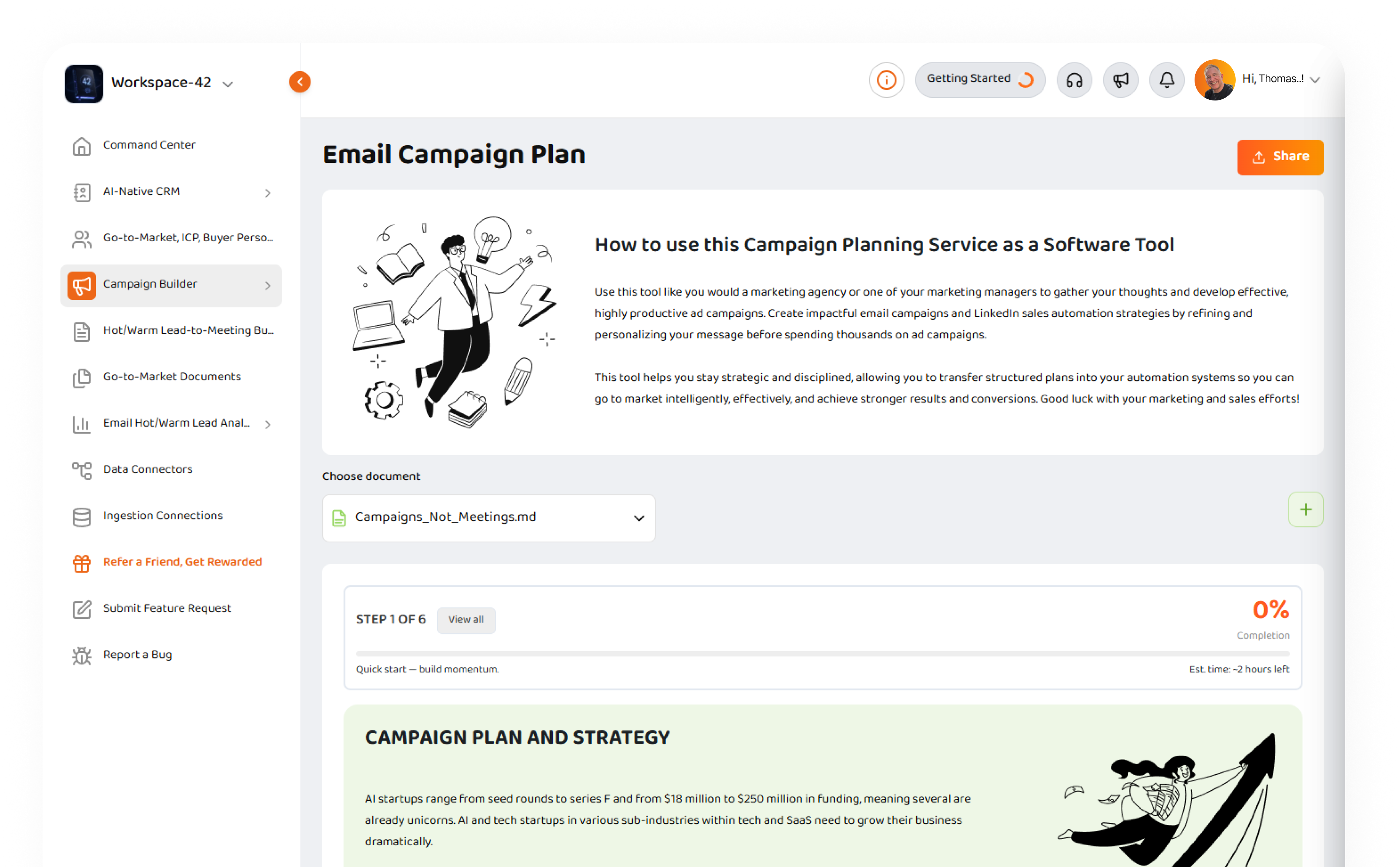
Build complete campaigns without hiring an expensive agency.
Strikezone Campaign Builder teaches small and medium business teams how to build complete campaign plans for Email, Google, Meta, and LinkedIn. Work step by step through strategy, goals, ICPs, buyer personas, offers, copy, creative requirements, budget, targeting, and launch-ready campaign elements. Then take your plan into the channel where you run the campaign.
Explore Product
Campaign planning should not cost $2,000 a month before you even launch.
Small and medium business teams should not have to hire an expensive marketing agency just to organize their thoughts, define a strategy, write campaign copy, map audiences, and prepare launch-ready campaign assets. Strikezone turns that work into guided software so teams can build stronger campaigns themselves.
Plan before you spend
Get the strategy, audience, message, offer, creative direction, and campaign structure clear before wasting ad budget.
Think like a marketer
Strikezone teaches the planning logic behind each campaign so users understand what they are building and why it matters.
Use your own team
Founders, operators, sales teams, and marketing coordinators can build campaign plans without depending on an outside consultant.
Move into execution
Take the finished plan into Google Ads, Meta, LinkedIn, email tools, or Strikezone-connected workflows where supported.
Four campaign builders. One repeatable way to go to market.
Campaign Builder is a product family inside Strikezone. Each builder guides users through a structured planning workflow for a specific campaign channel while keeping the same professional builder experience, progress tracker, collaboration layer, and document output model.
| Builder | Best for | Helps users build | Output |
|---|---|---|---|
| Email Campaign Builder | Outbound, nurture, lifecycle, and meeting-generation campaigns | Strategy, goals, ICPs, buyer personas, segmentation, subject lines, preheaders, email copy, CTA, and sequence logic | Email campaign plan and 3-5 email sequence |
| Google Campaign Builder | Google search, shopping, YouTube, PPC, and demand-generation planning | Objectives, audience targeting, keyword/ad group logic, budget, bid strategy, ad copy, landing page direction, and measurement plan | Google campaign build plan |
| Meta Campaign Builder | Facebook and Instagram campaigns for demand, hiring, brand, offers, events, and lead generation | Campaign objectives, ad sets, audiences, problems/desires, ad angles, copy, creative direction, CTA, and funnel logic | Meta campaign plan and creative brief |
| LinkedIn Campaign Builder | B2B social selling, LinkedIn campaigns, and human-first outreach planning | ICP lead lists, warm-up actions, connection messages, InMail fallback, follow-up, compliance guardrails, and KPIs | LinkedIn campaign workflow and message sequence |
Built from real B2B growth-marketing services.
These builders are productized versions of the campaign planning, go-to-market, and B2B growth-marketing services that were previously delivered through a B2B marketing agency for more than five years. Strikezone takes that agency-grade process and turns it into guided software for SMEs worldwide.
Agency-grade thinking
Users get the structure behind professional campaign planning without paying an agency just to think through the basics.
Productized service workflow
The builder turns a repeatable consulting process into a software workflow that teams can reuse campaign after campaign.
Built for real execution
The output is not a decorative worksheet. It is a practical campaign plan with strategy, copy, audience logic, and next actions.
Improves over time
The builders will become increasingly AI-native with Frank AI - Sales Manager integrated deeper into planning, copywriting, review, and execution support.
Step-by-step teaching, not empty forms.
Strikezone teaches users while they build. The product explains what each campaign section is for, what decisions to make, and how the pieces connect. That matters because a strong campaign is not just copy. It is strategy, audience, offer, timing, budget, creative, channel fit, and follow-up working together.
Strategy and executive summary
Clarify the campaign idea, business context, market opportunity, and intended outcome.
Goals and objectives
Define measurable targets such as leads, meetings, conversions, opportunities, revenue, CTR, open rate, and booked meetings.
ICP and buyer personas
Choose the exact audience, company profile, job roles, pain points, buying triggers, and decision-makers.
Product or service fit
Explain what the offer does, why it matters, and which customer problem it solves.
Competition and UVP
Define competitors, differentiation, unique value proposition, hooks, claims, proof, and reasons to act now.
Campaign assets
Create headlines, subject lines, preheaders, body copy, CTAs, image direction, creative notes, and launch elements.
From campaign plan to execution.
Strikezone helps teams move from scattered ideas to launch-ready campaign structure. Users can complete a plan, collaborate on it, save it, share it, and take it into the channel or system where the campaign will run.
Define
Choose the campaign type, objective, audience, ICP, offer, and business goal.
Plan
Build the strategy, budget, targeting logic, buyer context, funnel path, and measurement plan.
Create
Write the campaign messages, ads, emails, subject lines, CTAs, creative briefs, and supporting copy.
Review
Use comments, team collaboration, Frank AI - Sales Manager, and workflow progress to tighten the plan.
Share
Save the plan into Documents, share it internally or externally, and use viewer licenses where appropriate.
Execute
Move the finished plan into Google Ads, Meta, LinkedIn, email/marketing automation tools, or Strikezone workflows where supported.
Email Campaign Builder
Email Campaign Builder helps teams plan full email campaigns and automated sequences before they send. Users can define the campaign strategy, ICP, buyer personas, goals, sequence structure, subject lines, preheaders, body copy, CTA, deliverability considerations, and follow-up logic.
Cold lead to SQL meeting lifecycle
Teach users how cold leads move toward MQL, MQL Active, SQL Prospect, SQL Active, and SQL Meeting Set.
3-5 email sequence planning
Guide users through welcome/value hook, pain-point story, authority/case study, objection handling, and urgency/final push.
Subject and preheader discipline
Prompt users to write strong first-impression hooks, supporting preheaders, and personalized copy.
Deliverability and compliance
Teach segmentation, authentication awareness, clean lists, unsubscribe, company address, and avoid-spam practices.
CTA clarity
Keep the campaign focused around one clear action instead of multiple competing asks.
CRM and follow-up logic
Help users plan how opens, clicks, landing-page visits, replies, and booked meetings turn into CRM follow-up.
Google Campaign Builder
Google Campaign Builder helps teams think through Google campaign structure before building inside Google Ads. Users can plan campaign objectives, target audiences, keywords, ad groups, budget, bid strategy, ad copy, landing pages, tracking, and optimization steps.
Campaign objective
Define whether the campaign is focused on sales, leads, traffic, awareness, video, shopping, or another outcome.
Audience and keyword targeting
Organize target audiences, keywords, interest clusters, placement logic, and negative keyword thinking.
Ad group structure
Separate campaigns and ad groups so targeting, copy, and measurement stay clean.
Budget and bids
Document budget assumptions, bid strategy, scheduling, device/location considerations, and optimization plan.
Ad copy and landing page
Write headlines, descriptions, CTAs, landing page direction, and creative notes before campaign build.
Measurement and iteration
Plan the metrics and optimization cycle so the campaign can improve after launch.
Meta Campaign Builder
Meta Campaign Builder helps teams plan Facebook and Instagram campaigns with clear objectives, audiences, ad angles, creative concepts, copy, CTAs, and funnel logic. Users can think through the emotional and practical reasons a target audience will respond before they spend money.
Campaign goals and objectives
Define what the campaign is meant to accomplish before choosing ad sets or creative.
Audience and customer avatar
Map location, interests, behaviors, needs, problems, desires, and reasons to click.
Problem and desire framing
Identify the core problem or desire the campaign solves and make that the center of the message.
Ad angles
Develop multiple angles such as benefit, pain removal, event, offer, proof, urgency, or brand story.
Creative and CTA structure
Plan image/video direction, primary text, headline, link description, and call to action.
Launch readiness
Organize the assets a team needs before opening Meta Ads Manager.
LinkedIn Campaign Builder
LinkedIn Campaign Builder supports B2B campaign planning and human-first LinkedIn outreach. It helps users build lead lists, prepare connection messages, plan warm-up actions, write follow-ups, define InMail fallback, and keep the workflow professional and safe.
ICP lead list planning
Define role, seniority, industry, geography, company size, account priority, and next action.
Warm-up workflow
Plan profile views, follows, meaningful comments, and engagement before outreach.
Connection composer
Write short, personalized connection messages with character-count discipline and token awareness.
Acceptance and follow-up
Plan thank-you messages, micro-questions, value-sharing, final bumps, and pause logic.
InMail fallback
Create short, outcome-oriented InMail with proof, asset, and soft CTA for high-value prospects.
Compliance and throttling
Use daily/weekly caps, randomization, local-time windows, and manual review gates to keep outreach human-first.
Frank AI - Sales Manager helps where campaign writing gets hard.
Campaign planning requires writing. Strategy, audiences, offers, subject lines, ad copy, landing-page direction, creative briefs, objections, and CTAs all need clear language. Frank AI - Sales Manager helps users write, refine, expand, summarize, and improve campaign content in context. The builder products will continue becoming more AI-native as Frank becomes more deeply integrated into each workflow.
Write faster
Use Frank to turn rough ideas into polished campaign strategy, ad copy, email copy, or messaging options.
Think more clearly
Ask Frank to challenge weak positioning, sharpen ICPs, clarify buyer pain, or improve the offer.
Improve consistency
Keep campaign messages aligned across Email, Google, Meta, LinkedIn, CRM notes, and sales follow-up.
Work in context
Use campaign plans, CRM records, documents, tasks, and customer context to improve recommendations where supported.
Progress tracking keeps teams moving.
The Campaign Builder uses the same professional workflow engine pattern used across Strikezone builders. Users can see where they are, what is complete, what comes next, and how much work remains.
Step X of Y
Show the current step and total number of steps for each builder.
Percentage complete
Give users a clear progress signal as they move through the workflow.
Workflow drawer
Let users open a right-side drawer to view completed, active, and upcoming steps.
Momentum messaging
Use professional reinforcement such as "Let's get started," "Great progress," "Momentum building," and "Final stretch."
Save state
Preserve work so teams can come back, continue, edit, and improve the plan.
Launch-ready completion
When complete, guide users toward generate, export, share, save as template, or next action depending on the builder.
Collaboration, Documents, viewer license, and sharing are built in.
Campaign planning is a team sport. Strikezone lets users comment, collaborate, save campaign plans into the Documents product, and share finished or in-progress plans internally or externally. With viewer licenses, teams can bring more people into review without turning every stakeholder into a full editing user.
Comments on plans
Teams can leave comments on campaign plans and builder sections so feedback stays attached to the work.
Saved campaign documents
Completed plans can live inside the Strikezone Documents product for reuse, reference, and collaboration.
External sharing
Users can share plans externally with clients, advisors, contractors, agencies, or stakeholders when appropriate.
Viewer license
Viewer access supports collaboration, review, and virality without requiring every person to have a full license.
Reusable plans
Teams can duplicate, revisit, and improve plans across campaigns, channels, and customer segments.
Social sharing loop
Shareable outputs help Strikezone spread through customer teams, partners, and external collaborators.
Who Campaign Builder is for.
Strikezone Campaign Builder is built for SMEs worldwide, but the workflow is useful for revenue teams of all sizes. It is especially valuable for small teams that need serious campaign strategy without the cost, delay, and dependency of an outside agency.
Founders and CEOs
Build campaign strategy, offers, and messaging without waiting for an agency or hiring a full marketing team.
Sales and revenue teams
Connect campaign planning to ICPs, buyer personas, SQL meetings, pipeline, and follow-up.
Marketing coordinators
Turn scattered ideas into structured channel plans, creative briefs, copy, and measurable goals.
SMB operators
Organize launch, seasonal, hiring, product, and lead-generation campaigns with a repeatable workflow.
Agencies and consultants
Use Strikezone to collaborate with clients, structure campaigns, share plans, and keep work organized.
Revenue teams of all sizes
Bring campaign discipline to teams that need better planning, not more expensive complexity.
Campaign Builder FAQ
Clear answers about the Email, Google, Meta, and LinkedIn campaign builders, Frank AI, and how planning connects to execution.
Build the campaign before you spend the budget.
Use Strikezone Campaign Builder to plan your Email, Google, Meta, or LinkedIn campaign; organize the strategy, ICPs, buyer personas, offer, message, copy, creative direction, and measurement plan; collaborate with your team; save the work; and move into execution with confidence.