

Onboarding to Strikezone
Meta Ads Campaign Plan Quick Start
Turn a Facebook or Instagram advertising idea into a structured Meta Ads Campaign Plan. Define what the campaign must accomplish, how success will be measured, who the campaign should reach, where the ads should run, what offer and message should lead, and what the first ad should contain.
Quick-start promise: In 10-15 minutes, open or create a Meta Ads Campaign Plan, understand the six-step workflow, define the campaign objective and success criteria, use Frank AI - Sales Manager in context, save your work, and know exactly how to continue toward a complete Facebook and Instagram ad plan.
Watch: How to Build Meta Ad Campaigns
Follow the current Strikezone Campaign Builder workflow for Facebook and Instagram advertising - from campaign strategy and Meta objectives through success criteria, placements, audience research, ad anatomy, and the first ad draft.
What You'll Do
By the end of the quick start, you will have:
- Opened Campaign Builder and selected the Meta Ads Campaign Plan for Facebook & Instagram.
- Opened an existing plan or started a new campaign plan.
- Understood the current six-step planning workflow and the View all workflow drawer.
- Defined a real Meta campaign objective and the business result it should produce.
- Used Frank AI - Sales Manager in context to refine the plan.
- Saved your work and moved forward without needing to complete the full two-hour planning exercise in one sitting.
Fast time to value
You do not need to finish every worksheet to get value. The first onboarding win is a clear, saved Meta campaign objective inside a plan you can continue.
Before You Begin
Have one real campaign idea in mind. You only need enough information to answer four questions:
- What product, service, offer, event, or business outcome are you promoting?
- Who should see the ads?
- Should the campaign run on Facebook, Instagram, or both?
- What result should the campaign produce - leads, engagement, visits, awareness, or another defined outcome?
If you already completed Go-to-Market Builder, keep the relevant ICP and Buyer Persona work available. The Meta Ads workflow includes audience, problem, offer, and positioning research that should stay consistent with your broader Go-to-Market strategy.
Step 1 - Open or Create a Meta Ads Campaign Plan
Open Campaign Builder from the Strikezone left navigation. Choose the Facebook & Instagram planning product. In the current application UI shown in the walkthrough, this product is still labeled "Facebook & Instagram Campaign Plan." The approved onboarding and future-facing product label is "Meta Ads Campaign Plan" with the descriptor "Facebook & Instagram."
Use Choose document to open an existing plan. To start a new plan, use the + control and name the campaign so your team can recognize it later.
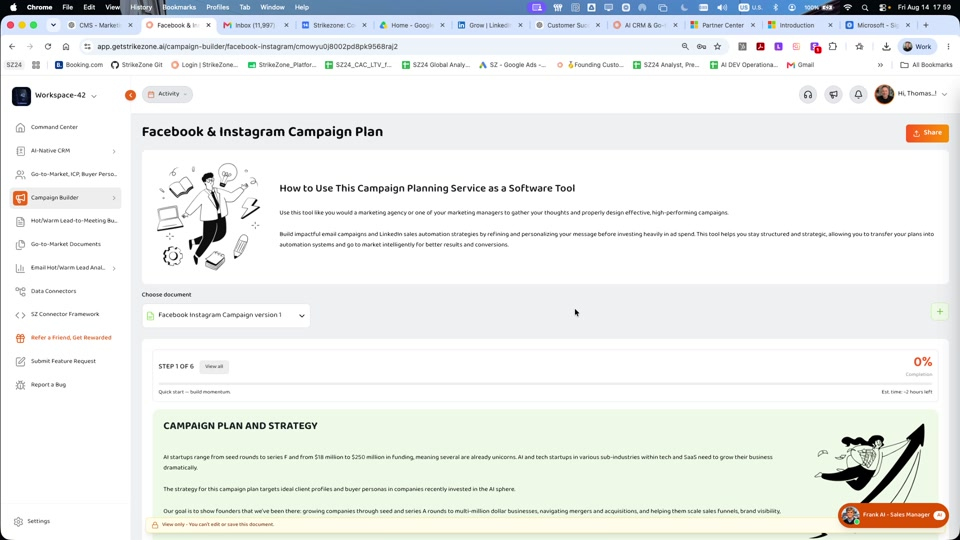
Menu & Landing — Campaign Builder menu + all campaign plan options
First orientation win
You are now inside a structured Meta advertising plan rather than a blank document or disconnected AI conversation.
Step 2 - Understand the Six-Step Workflow
At the top of the campaign plan, Strikezone shows your current step, completion percentage, estimated time remaining, and a View all control. Select View all to open the Workflow Steps drawer.
The current Meta / Facebook & Instagram campaign workflow contains six steps:
1. Campaign Plan & Strategy (Demo Methodology)
2. Meta Objectives & Success Criteria (Leads, Engagement, Visits, Awareness)
3. Cold Lead → SQL Meeting Lifecycle (Teaching + Quant Goals)
4. Campaign Type & Placement Choice (Facebook vs Instagram vs Both)
5. Ads Worksheet (Problems, ICPs, Offer, Competitors, Research Sources)
6. Anatomy of a Facebook/Instagram Ad + Checklist + Create Your Ad
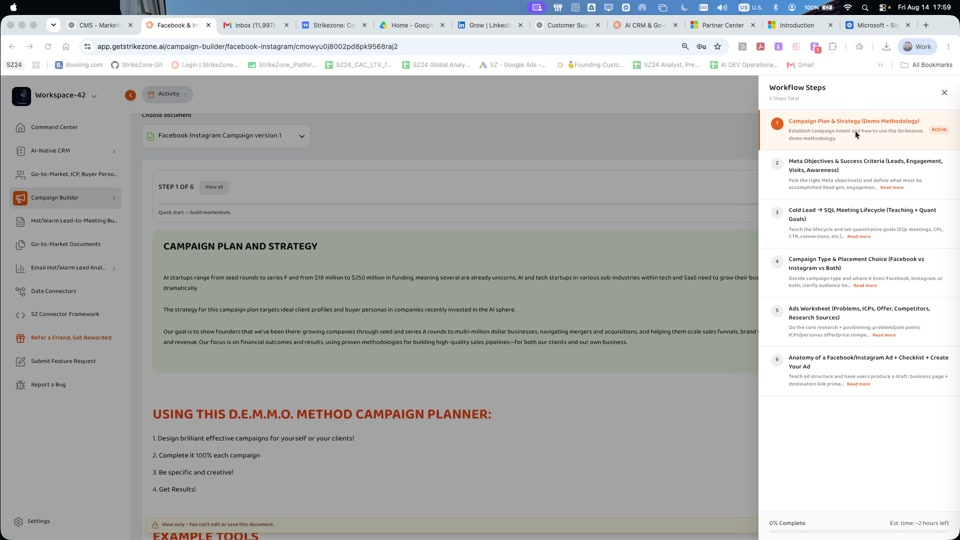
Workflow Drawer — Six-step workflow with progress
Use the workflow drawer as your map. Applicable steps provide Back and Save and Continue controls so you can progress without losing the work already entered.
Step 3 - Define Your Meta Campaign Objective
Move into the Meta Campaign Objective, Plan, & Strategy section. The current product asks you to outline the key goals, target audience, channels, and timeline for the campaign.
Start by defining what this campaign must accomplish. The workflow explicitly calls out Meta objectives and success criteria such as leads, engagement, visits, and awareness. Choose the outcome that actually matches the business purpose of the campaign.
Keep the first objective specific enough that your team can later judge whether the campaign worked. Examples:
- Generate qualified leads from a clearly defined audience and offer.
- Drive relevant website visits from the target ICP and measure what happens next.
- Build awareness within a defined market or Buyer Persona before a later conversion campaign.
- Increase meaningful engagement around a launch, event, product, or offer.
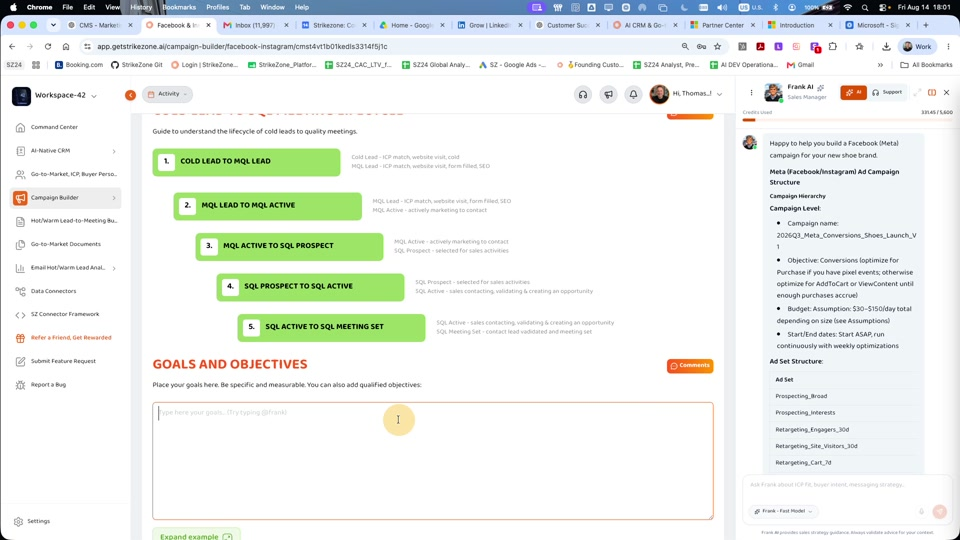
Lifecycle & Goals — Lifecycle model + goals/objectives fields
Objective before creative
Do not start with the image, headline, or ad copy. Start with the business result the campaign must produce.
Step 4 - Use Frank AI in Context
Long-form planning fields show @Frank guidance. You can use Frank AI - Sales Manager in context to help clarify strategy, challenge assumptions, and refine the wording already inside the plan.
Useful quick-start prompts include:
Help me turn this Meta campaign idea into one clear objective and two measurable success criteria.
What is unclear or too broad about this target audience?
What should I validate before choosing Facebook, Instagram, or both?
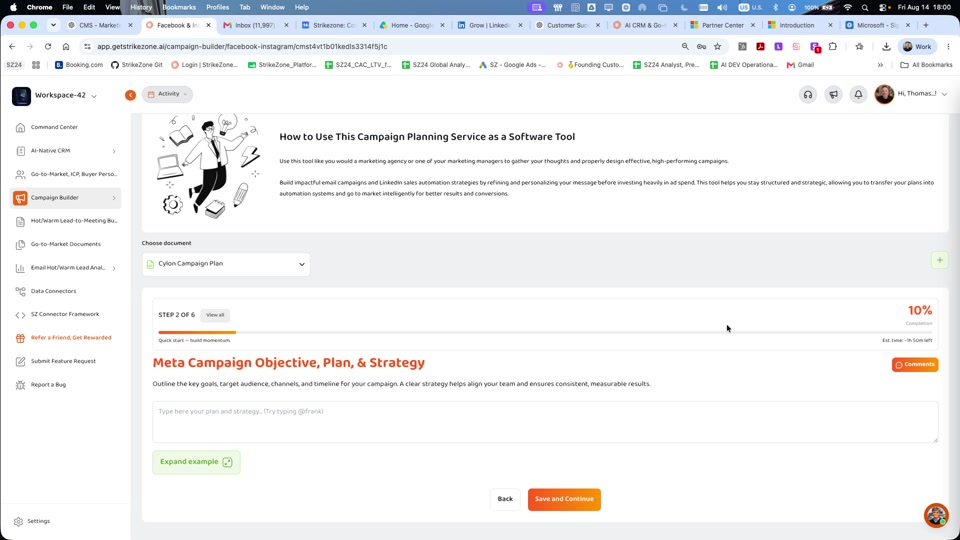
Frank Interaction — @Frank refinement + Insert/Replace actions
Review Frank's suggestions before applying them. The planning decision remains yours. Use Frank to accelerate critical thinking, not to replace your knowledge of the customer, product, market, or offer.
You Did It - Your Meta Campaign Foundation Is Started
Quick Start Complete
You have opened a Meta Ads Campaign Plan, understood the six-step workflow, defined a real campaign objective, used Frank AI in context, and saved the first useful foundation of the campaign.
Your quick-start loop is complete:
Choose Meta Ads → Open Plan → Define Objective → Refine with Frank → Save → Continue
You can stop here and return later, or continue through the complete planning workflow.
Continue the Full Meta Ads Campaign Plan
The complete Meta Ads Campaign Plan is a deeper planning and research exercise. The live product currently shows an estimated completion time of approximately two hours. Work through the remaining sections at the depth appropriate for the campaign.
Step 1 - Campaign Plan & Strategy
Use the opening Campaign Plan and Strategy section to establish campaign intent and review the D.E.M.M.O. methodology guidance shown in the product. The visible guidance emphasizes designing effective campaigns, completing the plan, being specific and creative, and focusing on results.
Treat this section as the strategic foundation. Make the campaign purpose clear enough that a teammate can understand why the campaign exists before they reach the execution worksheets.
Step 2 - Meta Objectives & Success Criteria
Define the Meta objective or objectives and what success should mean for the campaign. The workflow explicitly references leads, engagement, visits, and awareness. The detailed planning field asks for the key goals, target audience, channels, and timeline.
Do not mix every possible objective into one campaign by default. A clearer objective makes later audience, placement, message, and measurement decisions easier.
Step 3 - Cold Lead to SQL Meeting Lifecycle
Use the lifecycle teaching model to connect campaign activity to a business outcome. The current product shows a progression from Cold Lead to MQL Lead, MQL Active, SQL Prospect, SQL Active, and SQL Meeting Set.
Below the lifecycle, use Goals and Objectives to add specific and measurable quantitative goals. The workflow drawer calls out metrics such as SQL meetings, CPL, CTR, conversions, and related success measures.
Use only the metrics that are relevant to the campaign objective. Do not optimize for a metric simply because it is available.
Step 4 - Campaign Type & Placement Choice
Use Campaign Types and Social Media to define the campaign structure, choose the campaign objective or objectives, determine the number of ad sets and ads, decide on creative formats, and select where the campaign should run.
The current workflow frames the placement decision as Facebook, Instagram, or both. Choose the placement based on where the intended audience is most relevant to the campaign, not because every available placement must be used.
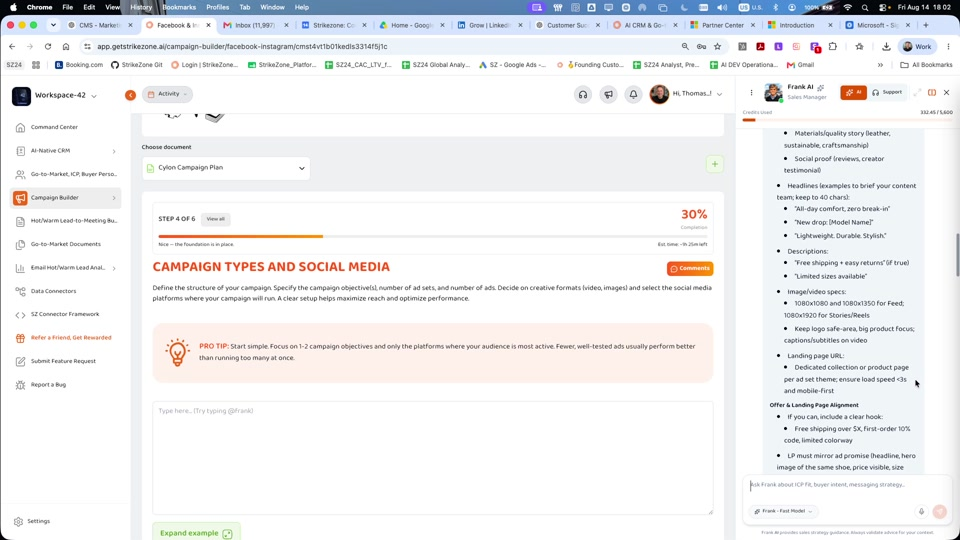
Product Step — Product/service form + progress + navigation buttons
Pro tip
Start simple, focus on one or two campaign objectives, and use the platforms where the audience is most active.
Step 5 - Ads Worksheet
Use the Ads Worksheet to work through the research and positioning behind the ad before finalizing creative.
The current walkthrough shows planning areas including:
- Problems: the top business or customer problems in the market.
- Pricing: how the product or service is priced.
- Ideal Customer Profile / Client Avatars: fields such as age, gender, location, likes, interests, and buying behaviors where relevant to the campaign.
- Product or Services Evaluation for Ads Suitability, Messaging, and Planning: the performance or benefit that solves the problem or fulfills the audience desire.
- Market sophistication: how aware or sophisticated the market is.
- Competition: the competitive context that affects positioning.
- Research sources: the current workflow includes industry magazines and Facebook business pages as examples.
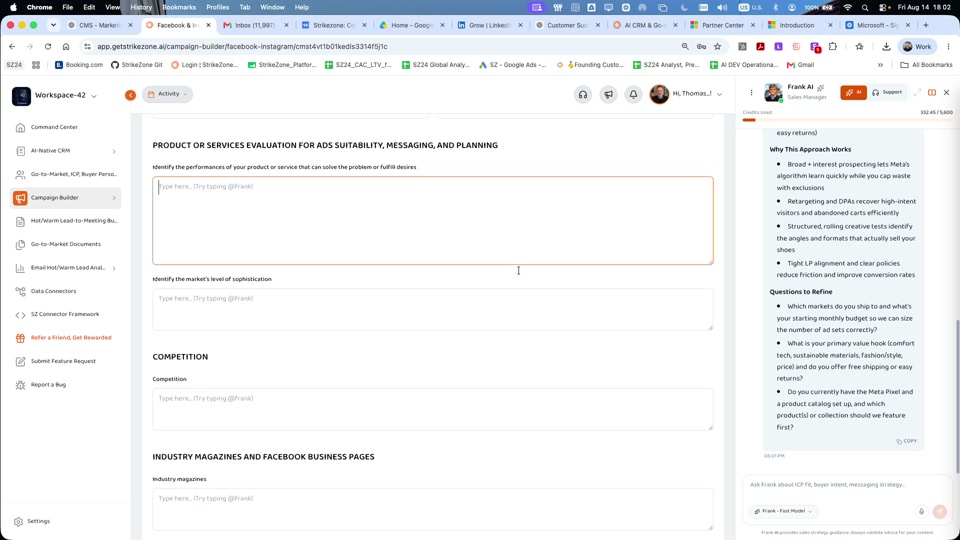
Competition & UVP — Competitor table + value proposition
Use @Frank in long-form fields where available to ask for questions, alternatives, or refinements. Validate the final inputs against your real market knowledge and customer evidence.
Step 6 - Ad Anatomy, Checklist & Create Your Ad
The final step teaches the structure of a Facebook / Instagram ad and then asks you to create a first ad draft inside the plan.
The current ad-anatomy diagram calls out core components such as brand identity, primary post text, the visual element, headline, and call-to-action button. Use it as a planning reference for a clear, coherent ad rather than as a guarantee of platform publishing behavior.
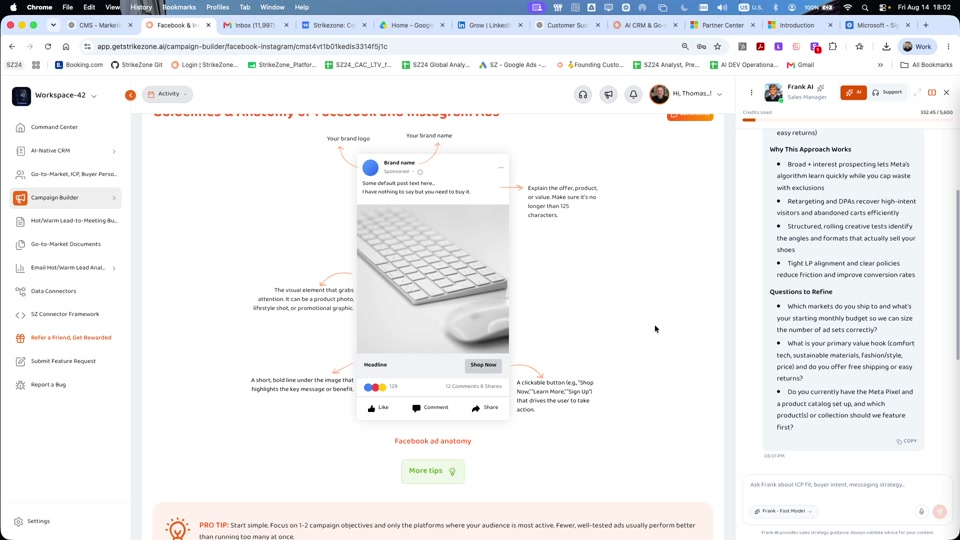
Ad Anatomy — Ad structure/checklist reference
Before creating the draft, the product includes a checklist that asks whether the ad is:
Create Your First Ad Draft
In Create Your Own Ad, complete the first draft using the fields currently shown in the product:
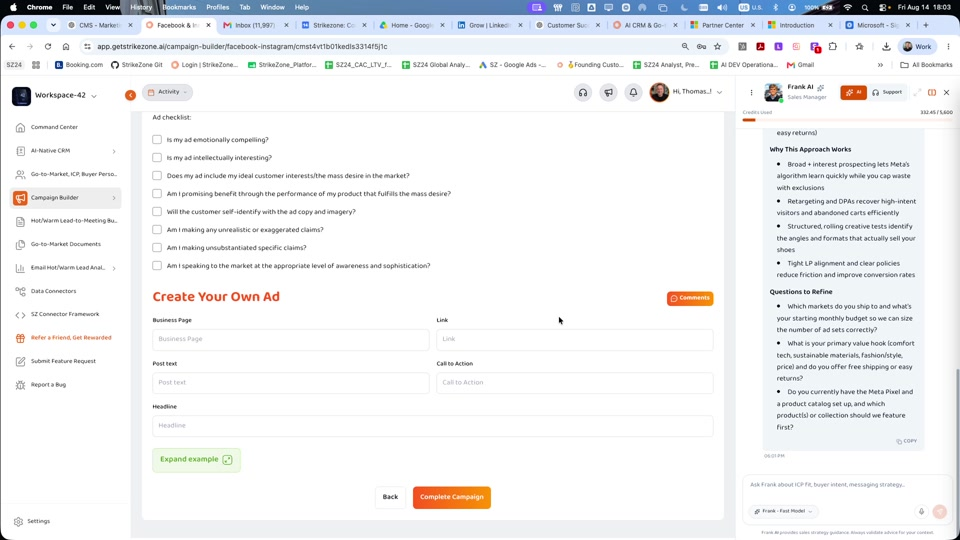
Ad Creation — Create ad form + Complete Campaign
Use Expand example where available if you need a model of the expected output. Review the ad against the checklist before selecting Complete Campaign.
Important product boundary
"Complete Campaign" completes the planning workflow shown in Strikezone. Do not describe this button as publishing, launching, or spending budget inside Meta unless the live product explicitly adds and verifies that execution capability.
Five Good Meta Campaign Questions to Ask Frank
Which campaign objective best matches the business result I want?
What would make this audience definition more specific and useful?
Should this campaign prioritize Facebook, Instagram, or both, based on the assumptions in this plan?
What is weak, generic, or unsupported about this offer and positioning?
Review this first ad draft and tell me what is unclear, unconvincing, or disconnected from the ICP.
Remember One Thing
A strong Meta ad does not begin with the image. It begins with a clear objective, a defined audience, a reason to care, an offer, and a measurable result. The creative should express that strategy - not replace it.
Meta Ads Campaign Plan principle
Objective first. Audience and placement next. Positioning before creative. Draft the ad only after the strategy is clear.
Continue Your Campaign Builder Onboarding
Google Campaign Plan Quick Start
Continue through Campaign Builder by learning how to structure the next channel-specific campaign plan using the current Google campaign workflow.
Need Help?
If you need help defining the Meta campaign objective, audience, placement, offer, success criteria, or first ad draft, contact the Strikezone team.
On this page