

Onboarding to Strikezone
Campaign Builder Quick Start
Turn your campaign idea into a structured Email Campaign Plan. Start with strategy and goals, then connect the right product, ICPs, Buyer Personas, competitive position, value proposition, and planned email sequence.
Quick-start promise: In 10-15 minutes, open or create an Email Campaign Plan, understand the six-step workflow, define the campaign goal, use Frank AI - Sales Manager to refine your thinking, save your work, and know exactly how to finish the full plan.
Watch: Campaign Builder - Email Campaign Plan
Follow the current Strikezone Email Campaign Plan workflow from channel selection and campaign strategy through goals, ICPs, Buyer Personas, value proposition, and email-sequence planning.
What You'll Do
By the end of the quick start, you will have:
- Opened Campaign Builder and selected Email Campaign Plan.
- Opened an existing campaign plan or started a new one.
- Understood the six-step workflow and how to jump between steps with View all.
- Defined at least one campaign goal or objective.
- Used Frank AI - Sales Manager inside a planning field to refine your thinking.
- Saved your work and moved into the next planning step.
Fast time to value
You do not need to finish the entire campaign plan in one sitting. The first win is a clear campaign objective saved inside a structured plan you can continue.
Before You Begin
Have one real campaign idea in mind. You only need enough information to answer three questions:
- What are you promoting?
- Who should the campaign reach?
- What business result do you want the campaign to produce?
If you already completed Go-to-Market Builder, keep the relevant ICP and Buyer Persona work available. The Email Campaign Plan workflow includes an ICP / Buyer Persona step designed to use that existing strategic context.
Step 1 - Choose Email Campaign Plan
Open Campaign Builder from the Strikezone left navigation. Use the Campaign Builder menu to choose the campaign-planning product that matches the channel you are working on.
For this quick start, choose Email Campaign Plan.
The current Campaign Builder menu also shows Facebook & Instagram Campaign Plan, Google Campaign Plan, and LinkedIn Campaign Plan.
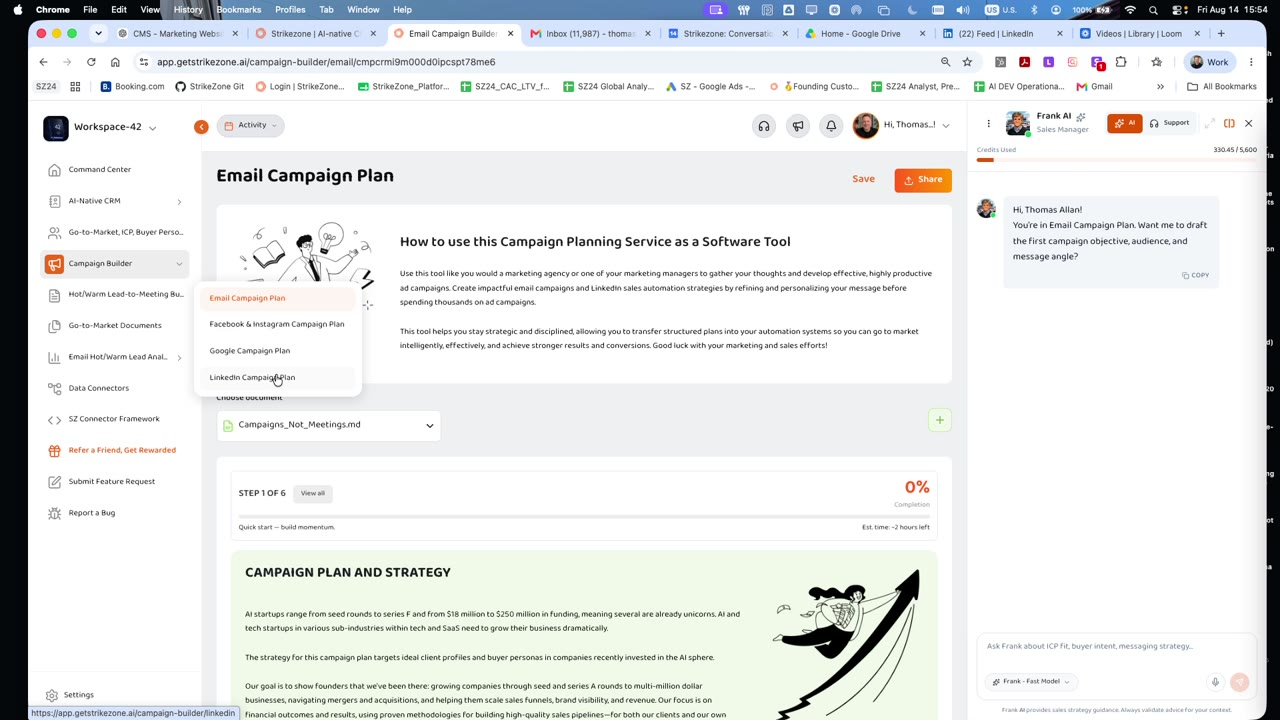
Current Campaign Builder menu and Email Campaign Plan landing view
Next, use Choose document to open an existing Email Campaign Plan. If you are starting fresh, use the + control to begin a new plan.
First orientation win
You are now working inside a channel-specific campaign plan rather than a blank document or disconnected AI chat.
Step 2 - Understand the Six-Step Workflow
At the top of the plan, Strikezone shows your current step, completion progress, estimated time remaining, and a View all control.
Select View all to open the Workflow Steps drawer. The current Email Campaign Plan contains six steps:
1. Campaign Plan & Strategy - D.E.M.M.O. Methodology
2. Cold Lead → SQL Meeting Lifecycle - Goals & Objectives
3. Product / Service Description - With Examples
4. ICPs & Buyer Personas - Import from GTM / Marketing / Business Plan
5. Competition + Unique Value Proposition
6. Anatomy of an Email + Sequence & Automation Build
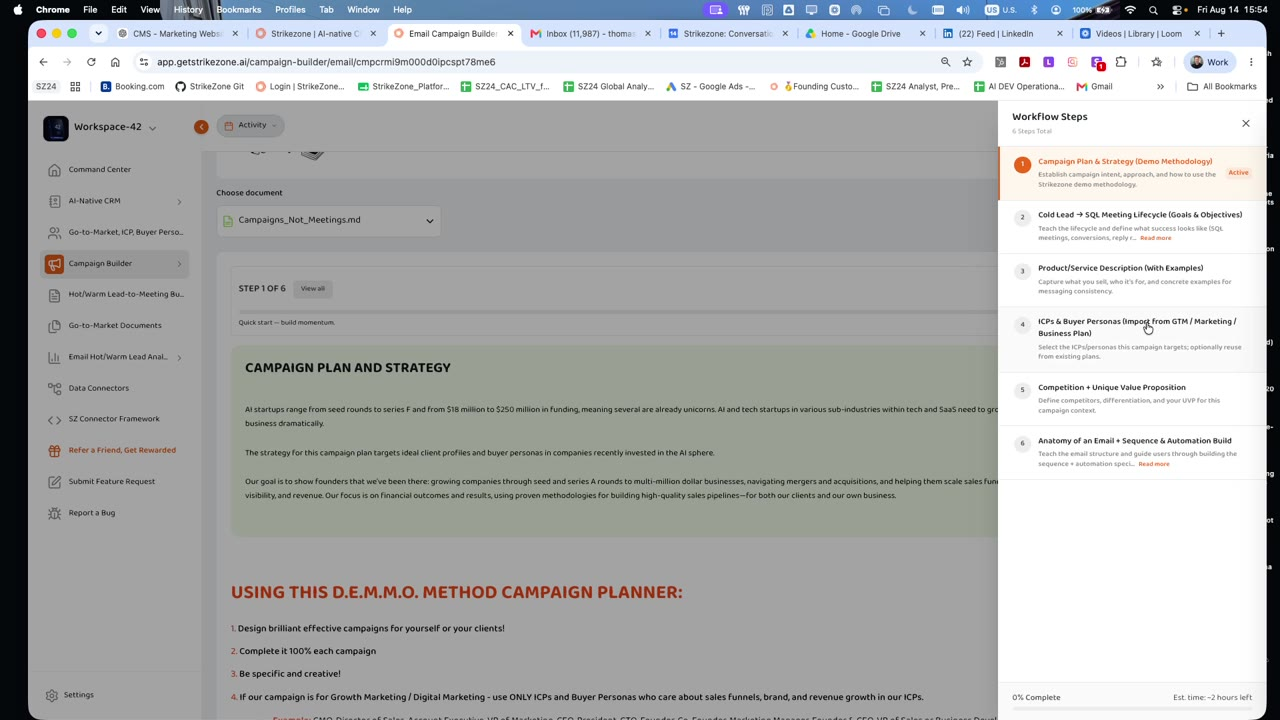
Current six-step Email Campaign Plan workflow drawer opened from View all
Use the workflow drawer to understand where you are and what comes next. Use Back and Save and Continue at the bottom of applicable steps to move through the plan without losing your work.
Step 3 - Define the Campaign Goal
Move to the Cold Lead → SQL Meeting Lifecycle - Goals & Objectives step. Review the lifecycle model so you are clear about the business outcome the campaign is designed to support.
Then enter one or more Goals and Objectives. Keep the first version measurable and connected to the campaign outcome.
Good starting examples include:
- Generate qualified conversations from a defined ICP audience.
- Move engaged leads toward a Sales Qualified Lead meeting.
- Increase response or conversion from a specific audience and offer.
- Create a repeatable follow-up sequence for a launch, event, offer, or audience segment.
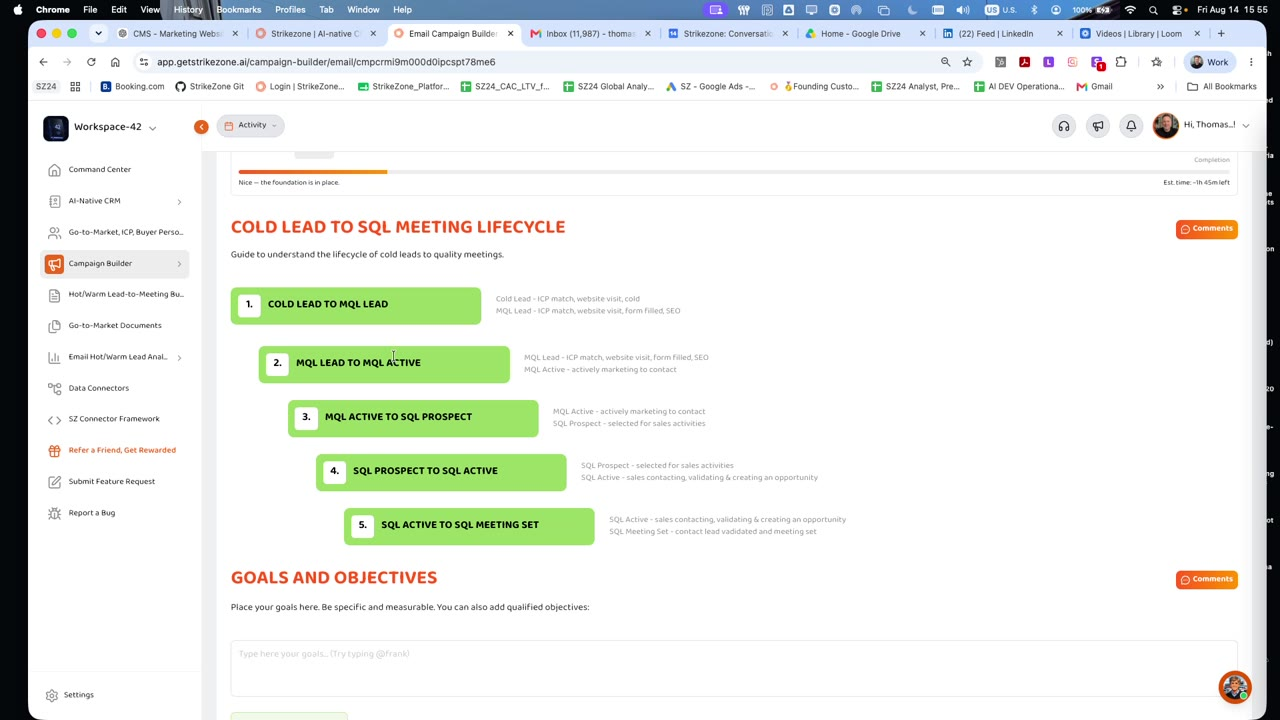
Current Cold Lead → SQL Meeting Lifecycle and Goals & Objectives section
Keep the objective practical
Start with the business result. You can refine channel metrics, timing, and execution details as you continue the plan.
Step 4 - Use Frank AI Inside the Planning Fields
In long-form planning fields, you can type @Frank to open Frank AI - Sales Manager in context.
Use Frank to help refine the strategy already in front of you rather than starting a separate conversation somewhere else.
Help me turn this into a measurable objective for an email campaign targeting our highest-priority ICP.
Rewrite this goal so it is more specific and directional.
What questions should I answer before I finalize this campaign objective?
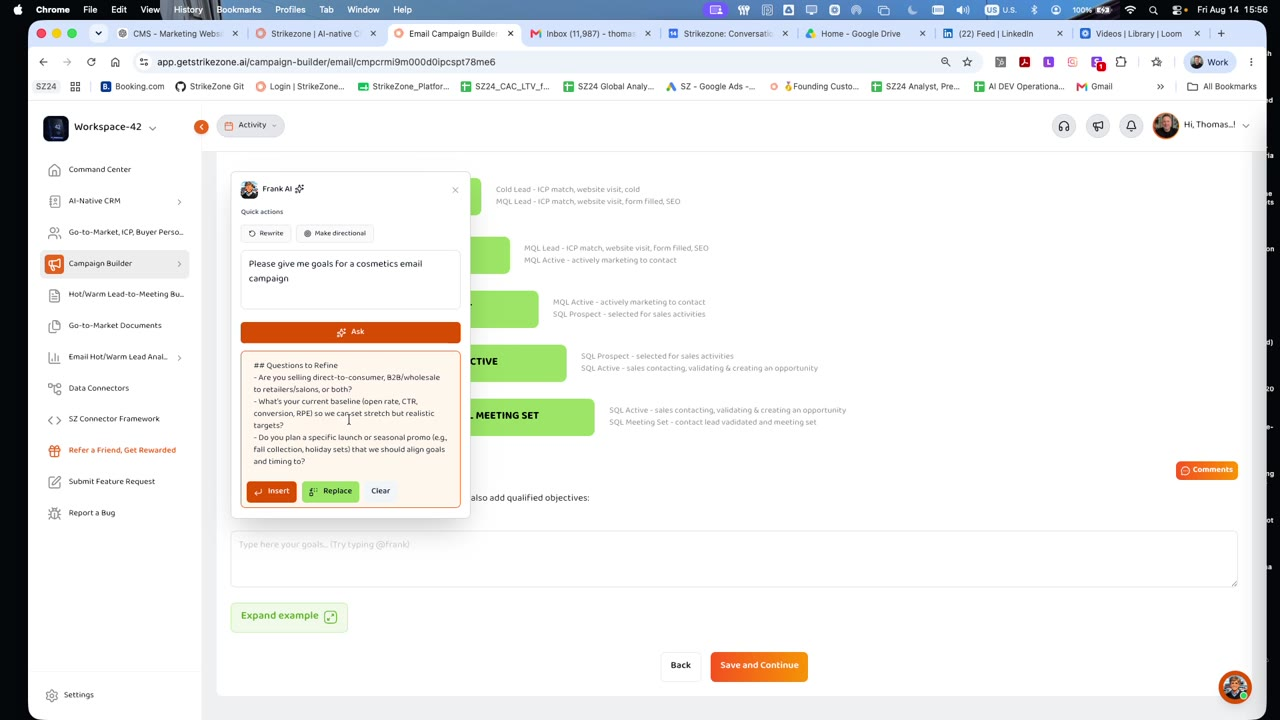
Current field-level @Frank interaction showing refinement questions and Insert / Replace actions
The current field-level Frank experience can return questions or suggested text and provides actions such as Insert or Replace. Review the output before applying it to your plan.
Frank should accelerate your thinking; you remain responsible for the business decision and final campaign direction.
You Did It - Your Campaign Foundation Is Started
Quick Start Complete
You have opened an Email Campaign Plan, understood the six-step workflow, defined a real campaign objective, used Frank AI in context, and saved the foundation of your campaign plan.
Campaign Builder activation loop
Choose Channel → Open Plan → Define Goal → Refine with Frank → Save → Continue
You can stop here and return later, or continue through the complete planning workflow.
Continue the Full Email Campaign Plan
The full Email Campaign Plan is a deeper strategy exercise. The live product currently estimates approximately two hours for completion, depending on the depth of the campaign.
Step 1 - Campaign Plan & Strategy - D.E.M.M.O. Methodology
Use the opening campaign-planning section to establish the strategic intent of the campaign and review the D.E.M.M.O. planning guidance. The purpose is to be specific about the campaign, the intended business outcome, and the audience before building messages or automation structure. Use Expand example where available when you need guidance or a concrete example.
Step 2 - Cold Lead to SQL Meeting Lifecycle - Goals & Objectives
Use the lifecycle model and Goals & Objectives section to define what success looks like. The current UI illustrates progression from cold lead through MQL and SQL stages toward a qualified meeting. Treat the lifecycle as a planning reference and align the goal to the actual audience, channel, business objective, and sales motion.
Step 3 - Product / Service Description - With Examples
Describe the product or service clearly and concisely. Focus on what it does, who it helps, and the main customer benefit. Avoid jargon. This section gives the campaign a consistent product truth that can be reused in messaging later in the workflow.
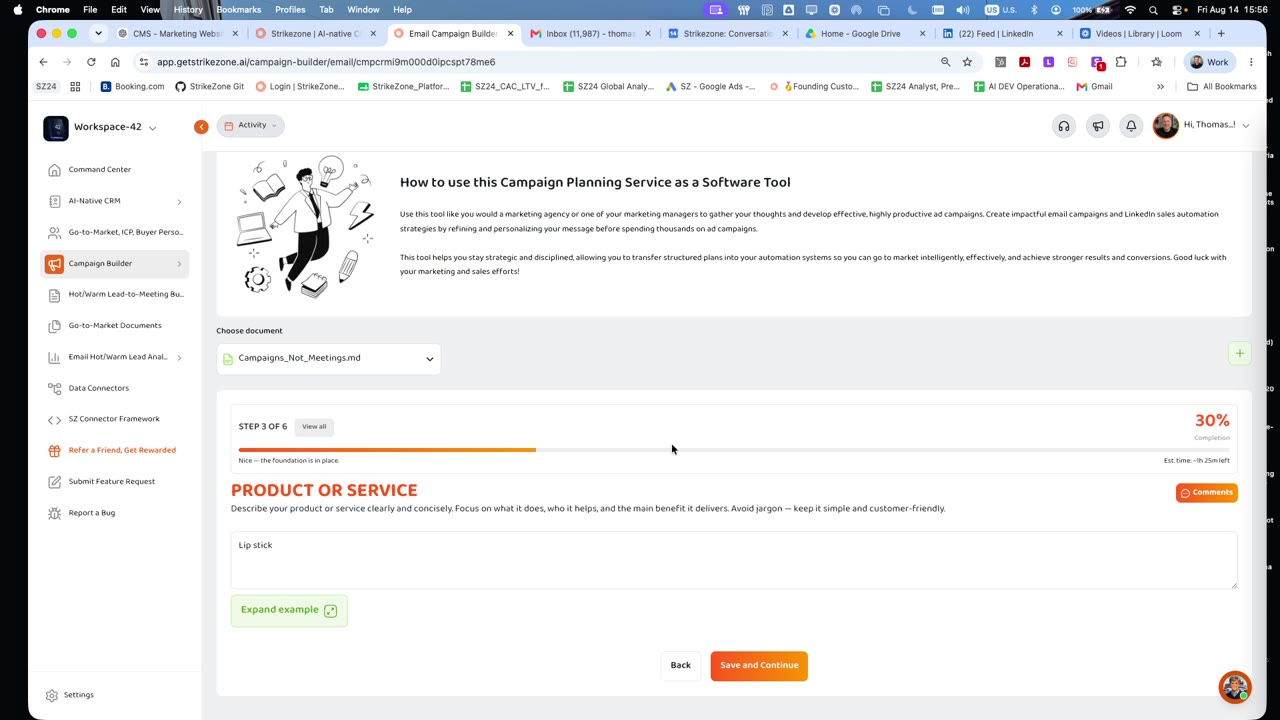
Current Product or Service step with progress header, Expand example, Back, and Save and Continue
Step 4 - ICPs & Buyer Personas - Import from GTM / Marketing / Business Plan
Select the ICPs and Buyer Personas this campaign should target. The current workflow is designed to reuse strategic audience work from your Go-to-Market, Marketing, or Business Plan where available. Choose the smallest relevant audience definition that matches the campaign.
Campaign relevance starts here
Your campaign message, offer, creative, and follow-up should be built for the people most likely to care about the problem you solve.
Step 5 - Competition + Unique Value Proposition
Add the competitors that matter for this campaign context. The current UI provides fields for competitor, pros, cons, and related products, followed by a Unique Value Proposition field. Use this section to explain why the target customer should choose your product or service instead of another option. Avoid vague claims such as "better" or "faster"; identify specific differentiators competitors cannot easily copy.
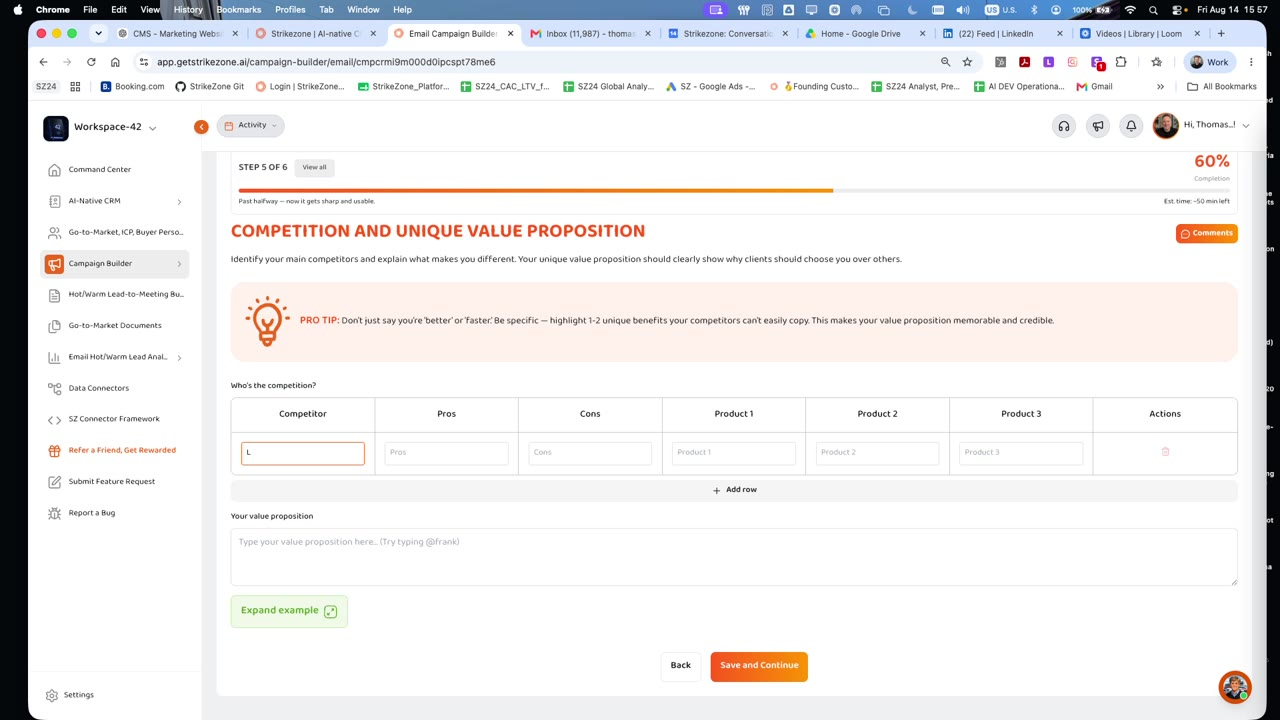
Current Competition and Unique Value Proposition step with competitor table and value-proposition field
Step 6 - Anatomy of an Email + Sequence & Automation Build
The final step teaches the structure of an effective campaign email and gives you a planning surface for the sequence. Use the anatomy reference as a checklist, not as a requirement that every email contain every optional element.
The current Email Anatomy reference includes:
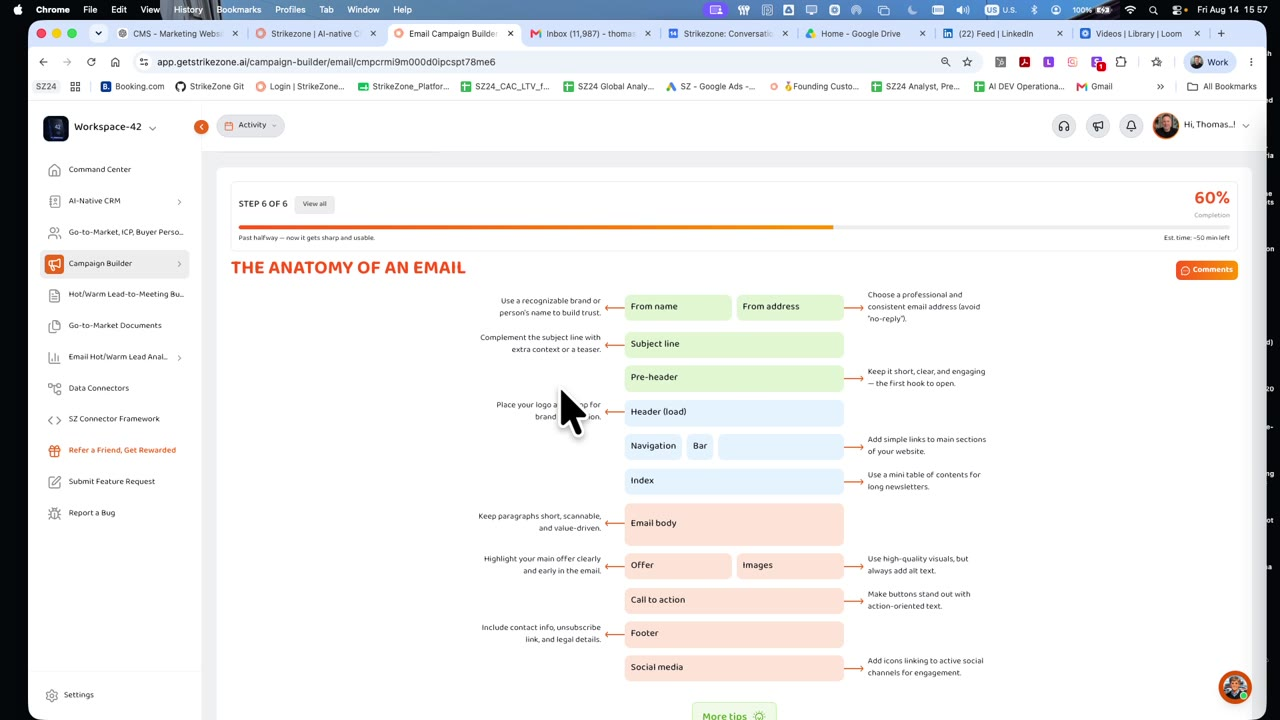
Current Anatomy of an Email planning reference
Build the Email Sequence
Below the anatomy reference, use Email Campaign Sequence & Automation to plan the flow of the campaign from the first message through follow-ups.
For each email, the current planning form can capture fields including:
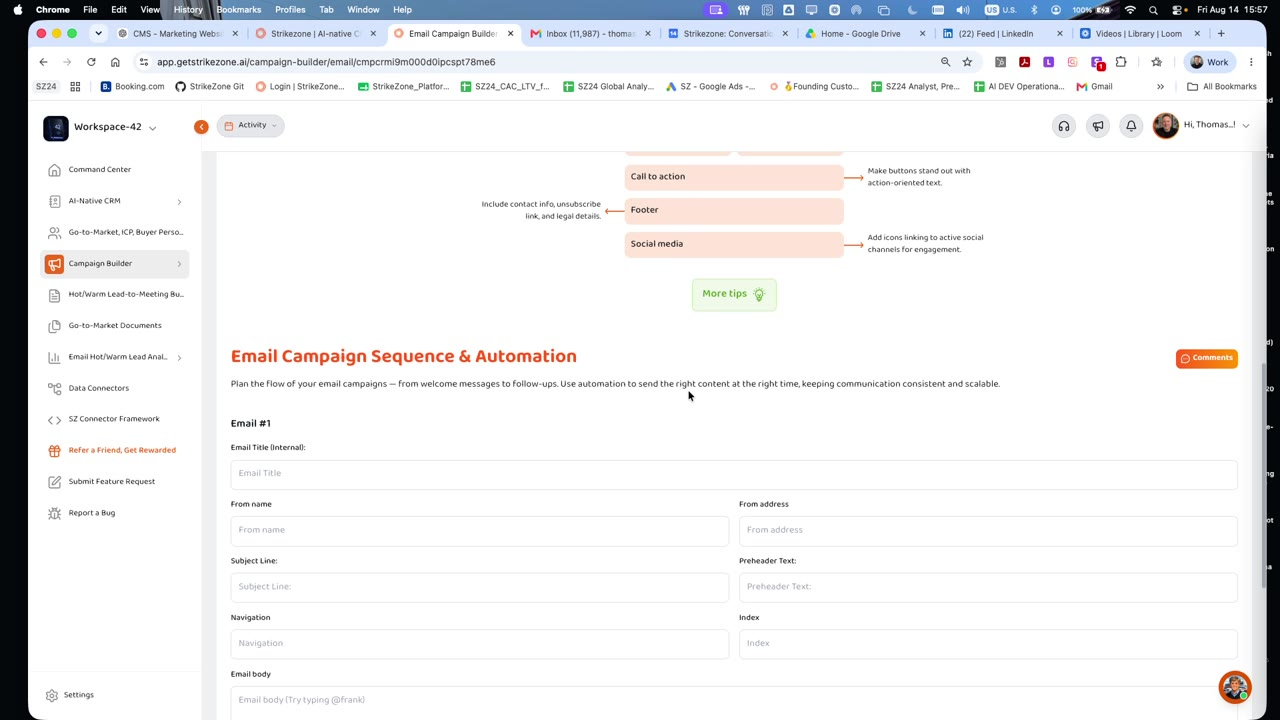
Current Email Campaign Sequence & Automation planning form
Add additional emails when the campaign requires a sequence. Remove unnecessary emails rather than creating a longer sequence by default. Use @Frank in long-form fields where available to draft, rewrite, or refine content in the context of the plan.
Important product boundary
This onboarding guide describes campaign planning. Do not imply that completing the Email Campaign Plan automatically sends or activates a marketing campaign unless the live product explicitly provides that execution action in the customer's workspace.
Other Campaign Builder Channels
Campaign Builder currently exposes multiple channel-specific planning products. The walkthrough shows:
Use the channel plan that matches the campaign you intend to run. This onboarding guide uses Email Campaign Plan as the worked example; other channel plans may have different step content and should not be assumed to use the identical six-step workflow.
Five Good Campaign Questions to Ask Frank
What is the clearest measurable objective for this campaign?
Which ICP and Buyer Persona should this campaign prioritize?
What is weak or generic about this value proposition?
What should the first email accomplish before I write the follow-up sequence?
What information is missing from this plan that would make the campaign more specific and credible?
Remember One Thing
A good campaign does not begin with the email body. It begins with a clear objective, the right audience, a real product truth, a differentiated reason to care, and a planned sequence of actions.
Campaign Builder principle
Strategy first. Audience second. Message next. Sequence after that.
Continue Your Strikezone Onboarding
Hot/Warm Lead-to-Meeting Builder Quick Start
Learn how to turn engaged Hot and Warm leads into structured follow-up actions and qualified sales conversations.
Need Help?
If you need help creating an Email Campaign Plan, selecting the right ICP or Buyer Persona, or understanding the six-step workflow, contact the Strikezone team.
On this page